
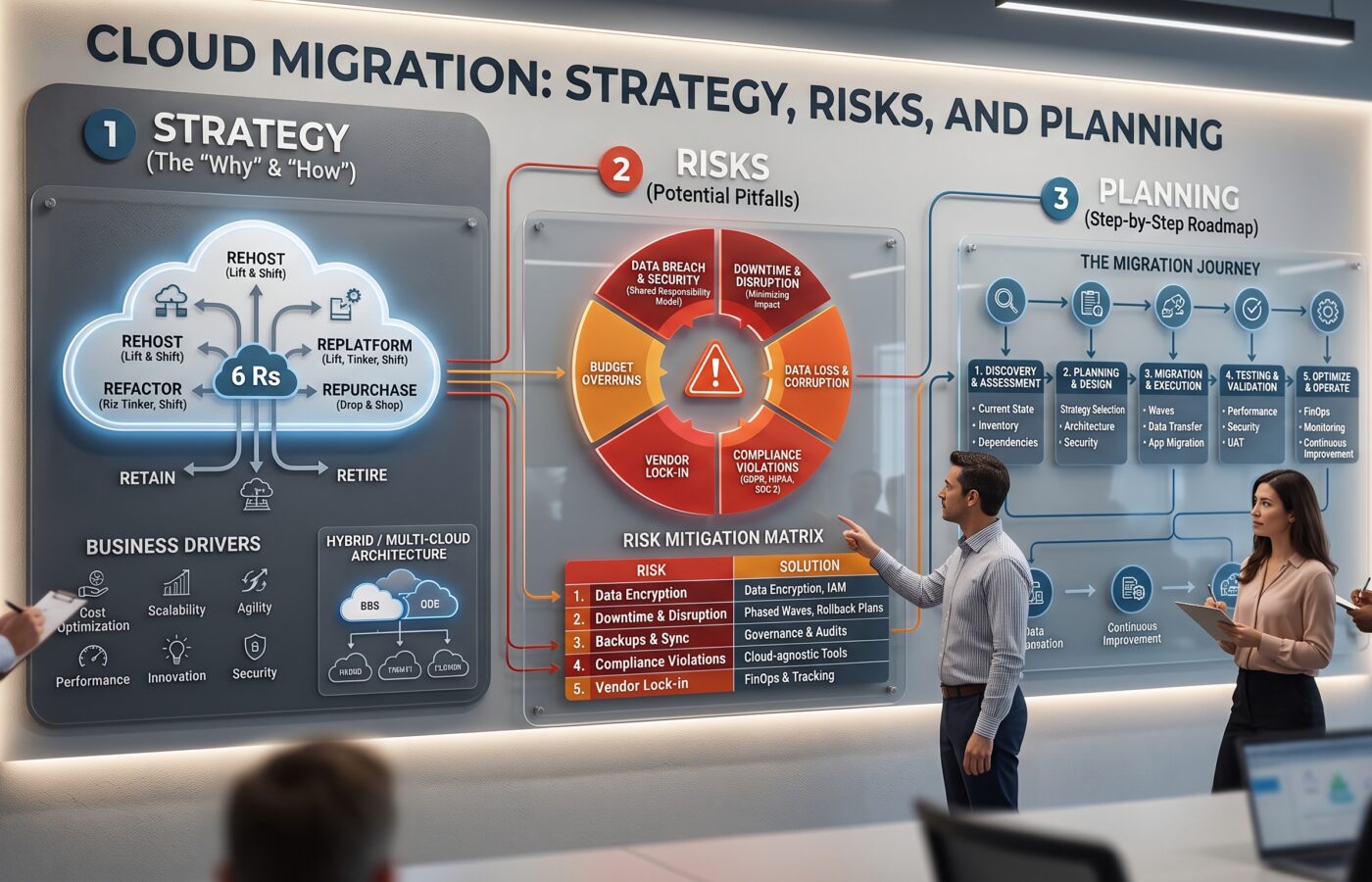
Cloud Migration: Strategy, Risks, and Planning

Cloud migration is not simply the process of moving servers from a company data center to a public cloud platform. Instead, it is a comprehensive business and technology transformation that can affect applications, data, security, operations, budgets, and the people responsible for keeping services running.
Ultimately, a successful cloud migration begins with a clear reason for change. For instance, some organizations want to reduce data-center costs, while others need greater scalability, faster software delivery, stronger resilience, or access to managed services. Although technology matters, the outcome matters more. Indeed, without defined goals, even a technically successful migration can become an expensive relocation project with little measurable business value.
Consequently, the most reliable approach is deliberate, phased, and based on evidence. Specifically, teams should understand their existing environment, choose an appropriate migration method for each workload, establish security and governance before moving production systems, and measure results after deployment. According to industry guidance, migration options are commonly grouped into seven distinct approaches: rehost, relocate, replatform, refactor, repurchase, retire, and retain.
What Cloud Migration Really Involves
Cloud migration can include moving applications, databases, file systems, virtual machines, containers, networking services, identity systems, monitoring tools, and backup platforms. Additionally, it may involve redesigning parts of an application so that it can take full advantage of cloud-native capabilities.
That distinction is critical because moving a workload without changing its design is fundamentally different from modernizing it. For example, a company may rehost an older application on virtual machines first and modernize it later. Alternatively, it may replatform the database, refactor the application, or replace the entire system with a software-as-a-service (SaaS) product.
Ultimately, the right decision depends on several factors:
- Business Value: Is the application still important to the business?
- Technical Debt: How much legacy debt does it contain?
- Scalability Requirements: Does it need to scale quickly?
- Compliance & Data Policy: Is the data subject to regulatory requirements?
- Availability & Downtime: Can the application tolerate downtime?
- Skills Availability: Does the organization have the skills to operate it after migration?
- Cost vs. Value: Would modernization cost more than the value it creates?
Therefore, there is no universal migration strategy; each workload requires its own dedicated assessment.
Start With Business Outcomes
A cloud migration plan should always begin with business outcomes rather than a provider, service catalogue, or technology trend. In short, “move everything to the cloud” is not a useful objective because it does not define success.
In contrast, a stronger objective might be to improve application availability, shorten release cycles, support seasonal demand, consolidate infrastructure, or reduce recovery times.
Core Key Performance Indicators (KPIs):
- Recovery: Recovery time (RTO) and recovery point (RPO) objectives.
- Reliability: Application availability and time required to restore service.
- Financials: Monthly infrastructure cost and resource utilization.
- Velocity: Deployment frequency and time required to provision environments.
- Operations: Customer response times and number of manual operational tasks.
- Compliance: Security and compliance findings.
Crucially, these measures should be agreed upon before migration work begins. Otherwise, teams may focus purely on completing technical tasks while leadership remains uncertain about whether the program delivered value.
Furthermore, a business case must include the full cost of change, such as assessment, architecture, migration tooling, data transfer, temporary duplicate environments, testing, consulting, staff training, licensing changes, support, and post-migration optimization.
Build an Accurate Inventory
Poor discovery is one of the most common causes of migration failure. Specifically, an application may look simple until the team discovers an undocumented database, an old reporting job, a hard-coded IP address, or a batch process that runs only once each month.
Essential Inventory Requirements:
- Infrastructure & Compute: Servers, virtual machines, containers, databases, and storage systems.
- Networking & Security: Network connections, firewall rules, APIs, and third-party integrations.
- Process & Identity: Scheduled jobs, background processes, identity/access dependencies, and backup arrangements.
- Governance: Data classifications, retention requirements, application owners, and support teams.
Moreover, dependency mapping is especially important since teams need to know which systems communicate with each other, which services share databases, and which applications depend on specific network paths or authentication services.
Consequently, I recommend classifying workloads by business criticality, technical complexity, data sensitivity, and migration readiness. As a result, selecting suitable migration waves becomes much easier—a low-risk internal application makes an excellent pilot, whereas a customer-facing payment system may require months of design, testing, and rehearsal.
Choose the Right Migration Approach
The seven commonly used migration approaches provide a practical framework for workload decisions:
Rehost
Rehost involves moving an application to the cloud with minimal changes, often described as a “lift and shift” approach. It is usually the fastest migration strategy because it requires limited application modification. However, while rehosting reduces migration time, it may not deliver significant efficiency improvements and can result in higher operational costs if the application is not optimized for the cloud environment.
Relocate
Relocate moves an existing workload to a different cloud platform or environment with little to no architectural modification. This approach is commonly used when migrating virtual machines, managed platforms, or infrastructure components between cloud providers. It allows organizations to move workloads quickly while maintaining the existing application structure.
Replatform
Replatform involves making targeted improvements to an application while avoiding a complete redesign. This approach allows teams to take advantage of cloud capabilities with moderate engineering effort. For example, an organization may migrate a traditional database to a managed cloud database service to reduce maintenance responsibilities and improve reliability.
Refactor
Refactoring redesigns an application to fully adopt cloud-native technologies and architectures. This approach can improve scalability, performance, flexibility, and resilience by using services such as containers, serverless computing, or managed cloud platforms. However, refactoring requires more development effort, deeper architectural changes, and careful planning.
Repurchase
Repurchase replaces an existing application or system with a commercial solution, typically a Software-as-a-Service (SaaS) platform. This strategy reduces infrastructure management responsibilities and allows organizations to adopt ready-made solutions. However, it may introduce challenges related to vendor dependency, customization limitations, and long-term service costs.
Retire
Retiring involves identifying and removing applications or workloads that no longer provide meaningful business value. By eliminating unnecessary systems before migration, organizations can reduce cloud costs, simplify operations, and avoid carrying outdated technology into the new environment.
Retain
Retaining means keeping specific applications or systems in their current environment instead of migrating them immediately. Organizations may choose this approach because of regulatory requirements, performance considerations, latency concerns, or unresolved technical challenges. These systems can be reviewed again when business priorities or technology conditions change.
Furthermore, these approaches are not permanent labels. For example, a workload can be rehosted in the first phase and subsequently refactored after the organization gains operational experience.
Design the Cloud Foundation First
Before moving important workloads, establish a secure and repeatable cloud foundation (often called a landing zone). Regardless of the name, the foundational capabilities it provides are critical.
Key Landing Zone Components:
- Governance & Identity: Account/subscription structures, identity management, privileged access, and role-based access control (RBAC).
- Network & Security: Network segmentation, encryption, key management, firewall rules, security policies, and vulnerability management.
- Operations: Logging, monitoring, backup, recovery, naming/tagging standards, infrastructure provisioning, and incident response.
- FinOps: Cost visibility and billing allocation.
In particular, identity deserves focused attention because cloud environments can easily be compromised through excessive permissions, stolen credentials, weak authentication, or poorly controlled service accounts. Therefore, enforce least privilege, separation of duties, and regular access reviews. Similarly, security should not be postponed; instead, test the target environment through configuration reviews, vulnerability assessments, and access checks before production workloads arrive.
Main Cloud Migration Risks
Although cloud migration risks are manageable, they must be identified early:
- Security Exposure: Misconfigurations can expose storage, credentials, or management interfaces. To mitigate this, implement secure baselines, automated policy checks, encryption, and centralized logging.
- Data Loss or Corruption: Data can be altered or lost during transfer. Therefore, use verified backups, checksums, database replication, and strict reconciliation reports.
- Downtime: Interruptions often result from overlooked dependencies rather than the data transfer itself. Consequently, mitigate risk using phased migrations, blue-green deployments, rehearsed cutovers, and documented rollback plans.
- Performance Problems: Latency or storage behavior can cause performance changes. Thus, test realistic workloads and measure response times, throughput, and failure behavior before launch.
- Unexpected Costs: Variable compute and data transfer rates can cause financial surprises. Because of this, establish FinOps practices, resource tagging, and budget alerts early.
- Compliance Issues: Moving data changes legal and contractual responsibilities under the shared-responsibility model. Hence, involve legal and compliance specialists from the start.
- Skills Gaps: Teams may lack experience in cloud automation and observability. As a result, align training directly with your target operating model.
Plan Migration Waves
Avoid treating migration as one enormous event; instead, divide workloads into structured waves based on dependencies, risk, business value, and technical readiness.
Recommended Wave Sequence:
- Phase 1: Assess the environment and define success measures.
- Phase 2: Establish the secure cloud foundation.
- Phase 3: Select, migrate, and evaluate a low-risk pilot.
- Phase 4: Improve tooling, documentation, and operating procedures based on pilot lessons.
- Phase 5: Move related workloads in controlled waves.
- Phase 6: Migrate high-criticality systems once operational processes have matured.
- Phase 7: Optimize environment, document architecture, and decommission obsolete infrastructure.
Furthermore, each wave should have strict entry and exit criteria. For instance, entry criteria may include dependency mapping and security sign-off, while exit criteria should include performance validation, monitoring confirmation, and operational handover.
Test More Than Deployment
Testing should cover the entire service rather than merely whether the application boots up properly.
Critical Testing Vectors:
- Technical: Functional, integration, performance/load, and security testing.
- Resilience: Backup restoration, disaster recovery, failover, and failure injection.
- Operational: Data integrity, access/authorization, monitoring/alerts, and runbook exercises.
In addition, teams should rehearse the migration using production-like data volumes and traffic patterns. Simultaneously, ensure your rollback plan is practical by stating clearly who makes the decision, how new data is captured, and how the original service is restored if a rollback occurs.
Operate and Optimize Afterward
Migration is complete only when the organization can operate the workload reliably in its new environment. In fact, the post-migration period is when teams discover whether their architecture, controls, and cost assumptions work in practice.
Post-Migration Checklist:
- Observability: Continuously monitor availability, error rates, latency, resource utilization, and user experience.
- FinOps Rightsizing: Base rightsizing on observed usage rather than initial guesswork; remove abandoned resources and adjust scaling rules.
- Retrospectives: Conduct a formal post-wave review to capture what went well and what failed. In this way, migration turns from a series of isolated projects into a repeatable engineering capability.
Frequently Asked Questions
What is cloud migration?
Cloud migration is the process of moving applications, data, infrastructure, and services to a cloud platform. Depending on the goal, it may involve simple relocation, modernization, replacement, or retaining workloads on-premises.
How long does cloud migration take?
The timeline depends heavily on workload volume, application complexity, and organizational readiness. While a small application may move in weeks, an enterprise program can take several years.
Is lift and shift a good strategy?
Lift and shift is ideal when speed or immediate data-center exits are required. However, it should rarely be assumed as the final long-term design.
What is the biggest migration risk?
Incomplete discovery, weak dependency mapping, security misconfigurations, and missing rollback plans regularly create the most severe problems.
How can migration costs be controlled?
Set early cost baselines, enforce resource tagging, set automated budget alerts, and conduct regular rightsizing reviews.
Should every application move to the cloud?
No. Some applications should be retired, retained, or replaced because moving them may not align with broader business or technical goals.
How many migration approaches should an organization consider?
The standard “7 Rs” (rehost, relocate, replatform, refactor, repurchase, retire, retain) serve as the best framework for evaluating each workload explicitly.
A successful cloud migration is planned as an operating-model change rather than a simple server-moving exercise.
In summary, the strongest programs define measurable business outcomes, build an accurate inventory, select appropriate strategies, establish security early, migrate in waves, and optimize continuously. Ultimately, careful planning protects schedules, budgets, and operational stability.
References
- IBM Think – The 7 R’s of Cloud Migration
- Sumo Logic – Eight Best Practices for a Successful Cloud Migration Strategy
- NetApp Blog – The 7 Rs of Cloud Migration: 7 Strategies Explained
- TierPoint – The 7 Rs of Cloud Migration: Defining What You Need to Know
- Datacom Technical Blog – Cloud Migration: How the 7 Rs Can Guide Your Migration Path
- LANSA – Cloud Migration: Strategy, Process & Benefits